
How Teachless Industrial Welding Robots Work: From 3D Scan to Weld
Nov. 20, 2026
For a steel fabricator running small batches of beams, frames, and heavy assemblies, programming each new part can take up a significant share of the job. On a conventional robotic welding cell, a programmer may need to define weld points, verify torch angles, and test the robot’s motion before production begins. That setup time is easier to justify when the same part runs for weeks. It matters more when the next batch brings a different joint layout.
The DONSIN RA Series teachless industrial welding robot uses 3D vision to locate weld seams and software to generate the robot’s welding path. The operator reviews the detected seams and confirms the job settings before starting the weld.
How the scan, confirm, and weld workflow works
- Scan the workpiece. A 3D vision system captures the geometry of the part and identifies candidate weld seams.
- Review the seams and plan the path. The operator reviews the detected seams in a 3D view and confirms the welding parameters. The software generates the robot path, including torch position and motion sequence.
- Run the weld. The industrial robot follows the planned path using the cell’s integrated torch, wire feeder, and welding power source.
Experienced welders still play an important role in setting process parameters, assessing fit-up, and inspecting the finished weld. Automating path generation gives them more time to focus on those decisions, particularly when part geometry changes between batches.
Inside the RA-S7 welding workstation
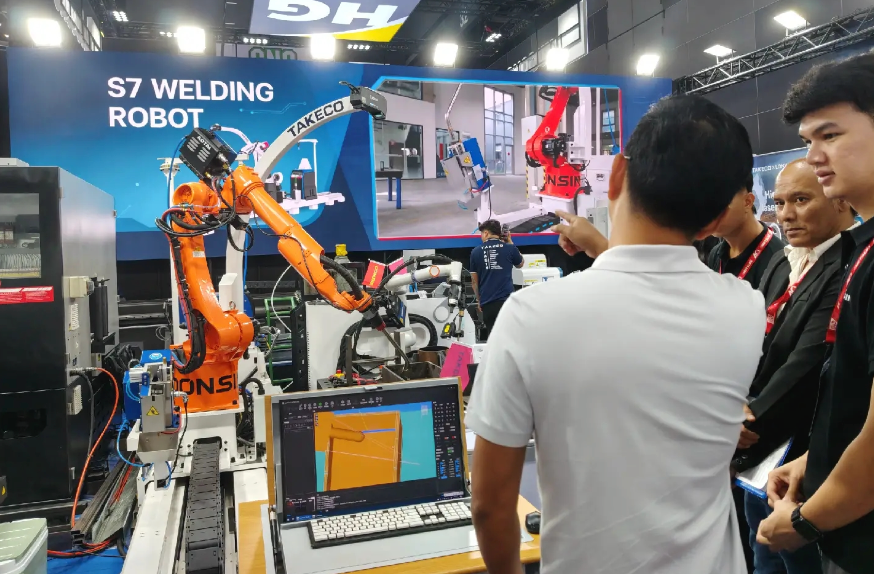
The RA-S7 exhibit shows how the pieces fit together. A six-axis arm mounted on a linear rail can travel along a large part, extending the working range beyond the reach of a fixed-base robot. The control station gives the operator a place to review seam locations and job settings. The torch, wire feeder, and power source are integrated into the workstation so the operator can manage the welding process from one cell.
Where teachless welding makes the most sense
The strongest candidates are often parts with long seams, recurring joint types, and enough variation to make repeated manual programming time-consuming.
- Structural steel fabrication — H-beams, columns, trusses, and other large welded assemblies.
- Shipbuilding and marine fabrication — Ship panels, hull structures, and tank assemblies with long or varied seam layouts.
- Construction machinery — Heavy frames and thick-plate assemblies where repeatable torch motion matters, including applications that require multiple passes.
- Energy and general fabrication — Large energy equipment structures, chassis, and frames that change across jobs or product variants.
For long workpieces, rail travel and cell layout are part of the configuration. DONSIN’s product selector includes options for workpieces in the 10–12 m range. The right setup depends on part weight, joint access, and how the workpiece will be held or repositioned during welding.
How to evaluate a system on your own parts
Start with a representative drawing or sample, ideally one that includes the joints that take the most time to program today. Share the largest workpiece dimensions and weight, material and plate thickness, joint types, welding process, batch sizes, output targets, and available floor space.
A trial weld on your own part can show whether the vision system reliably identifies the seams, whether the torch can reach the required joints, and how much operator time the job takes from setup to inspection. Those measurements give you a practical basis for comparing the proposed cell with your current process.
Explore DONSIN’s teachless industrial welding robots. Contact DONSIN to discuss your drawings or request a sample weld.


